
vidIQ Pricing 2026: What You Actually Pay (Beyond the Sticker)

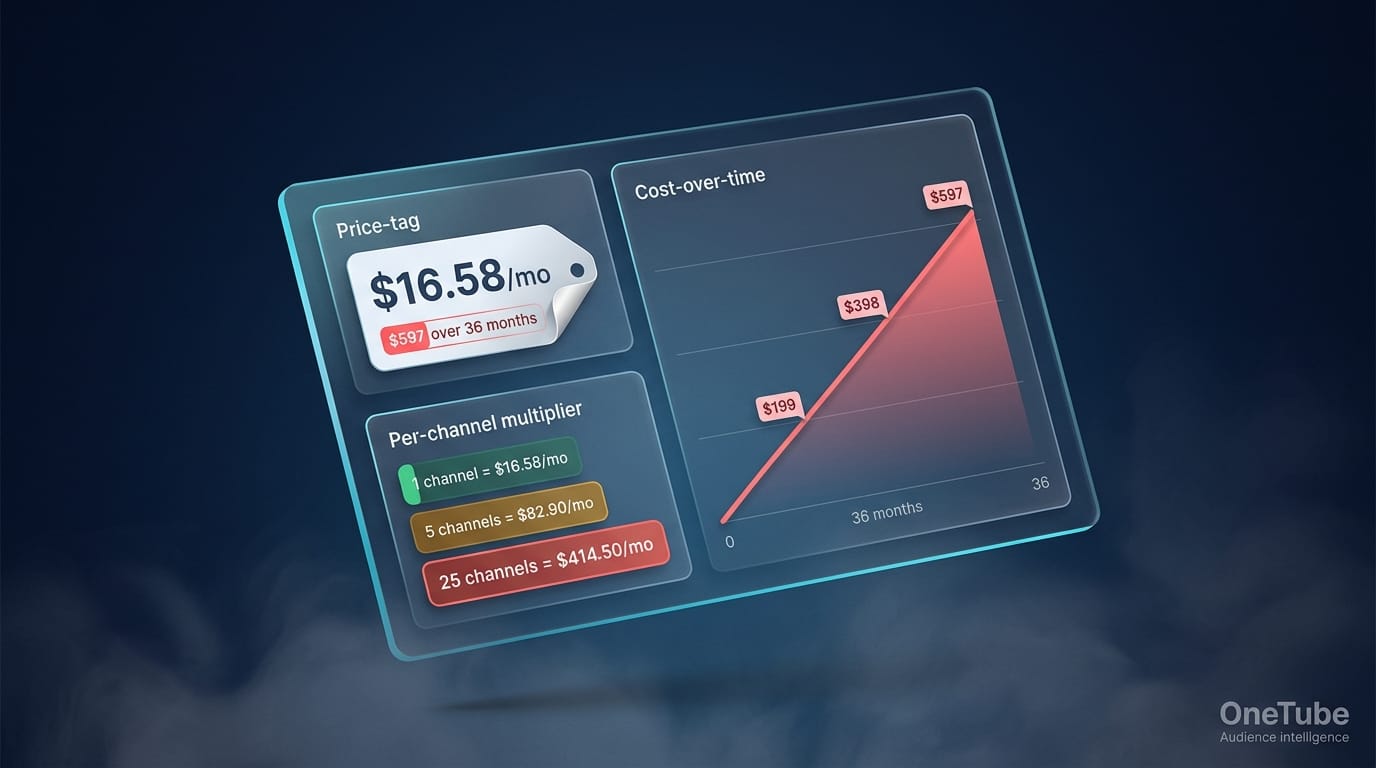
vidIQ's headline price is $16.58/mo on the Boost annual plan. That's the number on the pricing page. It is also not what you actually pay over three years if you commit, and it is definitely not what you pay if you manage more than one channel. And the cost a pricing comparison rarely surfaces: $16.58/mo on vidIQ never includes ingesting and classifying what your competitors' audiences are asking for at scale. That's a different category of tool, and it's the gap most pricing comparisons skip.
This article does the math the pricing page skips. Total cost of ownership over 12 / 24 / 36 months, the hidden costs that don't show on the sticker, and the cost-per-channel comparison that matters most for anyone managing more than a solo channel.
For the standard tier-by-tier breakdown — what's in each plan, what AI credits unlock, what the Coaching tier adds — see our full vidIQ review. This piece focuses on the math.
Key TakeawaysSticker price (Boost annual): $16.58/mo. Real cost over 36 months at that rate: $597 locked in, no prorated refunds available.vidIQ does not scale per-channel — Boost and Max are designed for single-channel use. Multi-channel requires Enterprise pricing (custom quote, typically several hundred dollars per month).At 5 channels managed, vidIQ effective cost per channel = $16.58/mo (5 separate Boost subs). OneTube Creator on annual = $3.00/mo per channel at the same channel count — roughly a 5× per-channel difference.The hidden costs that don't show on the page: no prorated refunds, AI credit overage on Free tier, paid tier credit metering, and the per-channel multiplier above.
vidIQ's sticker prices in 90 seconds
vidIQ runs four tiers as of 2026. The headline annual rates:
- Free: $0/mo, limited AI credits, basic keyword research
- Boost: $16.58/mo billed annually ($199/yr), $39/mo billed monthly
- Max: $39/mo billed annually only ($468/yr) — no monthly billing
- Coaching + Boost: ~$99/mo with 1-on-1 coaching
That's the sticker view. For what each tier actually unlocks (AI credit allowances, mobile app access, Max Mode AI, coaching), the full review covers the tier-by-tier feature map.
This article assumes you've decided vidIQ is a candidate. The question now: what does it really cost you over time, and how does it compare per-channel to alternatives?
The four hidden costs vidIQ's pricing page doesn't show
1. No prorated refunds on annual plans
vidIQ's published refund policy: if you cancel mid-cycle on an annual plan, you keep access until the renewal date and receive no money back. That's standard SaaS — but worth knowing before committing. Multiple Trustpilot reviews in 2024–2025 document users being unable to recover money after cancellation. Plan for the full year on commitment.
Cost implication: If you cancel Boost at month 3, you've still paid $199. Effective cost for 3 months of use: $66/mo, not $16.58/mo.
2. AI credit metering
The published credit allowances are 150 (Free) / 2,000 (Boost) / 6,000 (Max) per month. Power users on r/SmallYTChannel and Trustpilot have documented running into credit limits before month-end, particularly with the AI thumbnail generator (high credit cost per generation) and the Max Mode AI (which consumes credits at 5× the standard rate).
vidIQ's stated policy is that credits reset monthly but don't roll over. The unpublished policy that some reviewers report: certain interactions occasionally cost more credits than expected, with one Trustpilot review describing it as "bait-and-switch credit system that forces even paying subscribers to pay per interaction with their AI bot." Whether this is a fair characterization or a perception issue, it's the most consistent billing-related complaint about vidIQ in 2024–2025.
Cost implication: For heavy AI users on Boost, the realistic ceiling may be ~1,400–1,800 effective credits/mo, not the headline 2,000. If you run out mid-cycle, you either wait, downgrade your usage, or upgrade to Max.
3. Tier upgrade math
If you start on Boost and need to upgrade to Max mid-year, vidIQ charges the prorated difference. Sounds fair — but the comparison most users don't make: starting on Max from day one is often cheaper than starting on Boost and upgrading, because Max annual pricing ($39/mo) is structured for annual commitment. A mid-year upgrade pushes you into a partial-year Max that doesn't get the same annual discount.
Cost implication: If you suspect you'll need Max within 6 months, start there. The math doesn't reward the "try Boost first" path.
4. The per-channel multiplier — vidIQ's biggest unstated cost
This is the cost most prospective subscribers don't compute until after they've subscribed. vidIQ's Boost and Max tiers are designed for single-channel use. The dashboard binds to one YouTube channel per account. If you manage 5 channels — say, a creator with a main channel plus a Shorts channel plus 3 client channels — you have three options:
- Subscribe to 5 separate vidIQ Boost accounts: 5 × $16.58 = $82.90/mo
- Manage all channels from one account using browser profile switching (unsupported, fragile, no per-channel data history)
- Move to vidIQ Enterprise (custom pricing, typically several hundred dollars per month, designed for agency-scale use)
There is no in-between "Boost for 5 channels at a small upcharge" option. vidIQ's pricing is built for solo creators; multi-channel breaks the math.
OneTube Creator on annual ($15/mo) covers 5 channels — that's $3.00/mo per channel at full utilization, or roughly a fifth of vidIQ's per-channel cost. And those 5 slots can include your competitors. Spy Mode reads any public channel's comment section — yours or someone else's. The per-channel math matters; the per-channel ability matters more. We'll come back to this.
True cost of vidIQ over time
Below is the cumulative cost for each tier over 12 / 24 / 36 months on annual billing, assuming you commit and don't cancel.
| Plan | Year 1 | Year 2 | Year 3 (cumulative) |
|---|---|---|---|
| Free | $0 | $0 | $0 |
| Boost annual | $199 | $398 | $597 |
| Max annual | $468 | $936 | $1,404 |
| Coaching + Boost | $1,188 | $2,376 | $3,564 |
AI audit of any YouTube channel
Drop a competitor's URL. In 5–15 minutes, get the full breakdown of what's working, what's broken, and exactly what to film next.
- 🎯Their content ideasVideos their audience keeps asking for that they never made
- ⚠️Their weak spotsExact topics and formats where viewers tune out or push back
- 💬Audience questionsStraight from their comment section — your next 10 scripts
- 📋A ready content planRanked backlog of what to film next, pulled from real demand signal
- 🔥Their superfansWho's emotionally invested in the channel and what gets them to talk
Just a URL and an email. Report lands in your inbox.
Three-year context: a solo creator who subscribes to Boost commits $597 over 36 months for keyword research, AI Coach, Daily Ideas, and the Chrome extension overlay. That's reasonable IF those features actually move the needle for your channel. The number is also bigger than it feels — $16.58/mo reads as cheap, $597 reads as a real budget line.
A creator running 5 channels on Boost commits 5 × $597 = $2,985 over 36 months. The same creator on OneTube Creator ($15/mo annual) commits $540 over 36 months for the same 5 channels.
Cost per channel — the comparison that actually matters
If you run more than one YouTube channel, the right framing isn't "what does the tool cost." It's "what does the tool cost per channel."
| Channels managed | vidIQ Boost ($/mo total) | OneTube tier needed | OneTube $/mo | $/managed channel |
|---|---|---|---|---|
| 1 | $16.58 (single sub) | Creator (5 slots) | $15 | OneTube: $15.00 · vidIQ: $16.58 |
| 5 | $82.90 (5× subs) | Creator | $15 | OneTube: $3.00 · vidIQ: $16.58 |
| 10 | $165.80 (10× subs) | Pro | $39 | OneTube: $3.90 · vidIQ: $16.58 |
| 25 | $414.50 (25× subs) | Studio | $99 | OneTube: $3.96 · vidIQ: $16.58 |
| 50 | Enterprise (custom) | Agency Starter | $199 | OneTube: $3.98 · vidIQ: custom quote |
Notes: vidIQ figures based on Boost annual at $16.58/mo per channel (each channel needs a separate subscription on Boost/Max; multi-channel officially requires Enterprise pricing). OneTube figures use annual rates per tier with channels allotted to that tier — the per-channel cost only hits the lower numbers when you actually fill the channel slots. At 1 channel managed on OneTube Creator, you're paying for 4 unused slots. Sources verified May 2026.
The per-channel math diverges sharply once you cross 1 channel. The two tools serve different jobs (vidIQ optimizes published videos via keyword/SEO/AI; OneTube reads competitor comment intelligence for audience direction) — but if you're managing multiple channels and want at least one capability covered economically, the per-channel cost difference is real.
When does vidIQ's pricing math actually work?
vidIQ pricing works well for:
- Solo single-channel creators 10K–100K subs on Boost annual — $16.58/mo is genuinely competitive for AI ideation + trend overlay
- Single-channel creators who need the Coaching tier specifically and value 1-on-1 strategy work
- Creators willing to pre-commit annually and use the full year
vidIQ pricing works poorly for:
- Anyone managing 2+ YouTube channels (per-channel multiplier punishes growth)
- Creators who want to try-cancel-restart based on need (no refund flexibility)
- Heavy AI users hitting credit ceilings on Boost (forces Max upgrade that may not match value)
"YouTube Studio shows your metrics. OneTube shows what your competitors' audiences are asking for — verbatim, across every channel you track. The audience-voice section a dashboard can't produce."
Free ways to use vidIQ + DIY alternatives
The Free tier is permanent. You get the Chrome extension overlay (the most-loved feature), basic keyword research, and a small Daily Ideas allowance (150 AI credits/mo — enough for ~30 small interactions before exhausting). For sub-10K creators, this is often enough.
DIY alternatives if you don't want to pay:
- ChatGPT or another LLM ($20/mo for an existing Plus subscription, $0 incremental if you already pay): Paste channel data, ask for keyword and topic suggestions. Slower, more manual, no real-time overlay.
- youtube-comment-downloader (free CLI): Pulls your own channel's comments to feed into an LLM. Manual but free.
- Google Trends + TubeBuddy Pro ($4.50/mo annual): Cheapest paid alternative if you want keyword research and a Chrome extension without AI ideation.
We covered free YouTube channel analyzers — five tools tested, plus the gap they all share.
Frequently asked questions
Does vidIQ have a free trial?
vidIQ does not offer a time-limited free trial in the traditional sense. Instead, the Free tier is permanent — you can use vidIQ's basic features (Chrome extension overlay, keyword research, limited Daily Ideas) at zero cost indefinitely. There is no money-back guarantee on paid plans.
Can I downgrade vidIQ mid-cycle?
You can change your subscription tier at any time, but mid-cycle downgrades on annual plans don't refund the difference. If you downgrade from Boost to Free in month 6, you keep Boost access until the renewal date and then drop to Free. No money is returned for the unused 6 months.
Does vidIQ offer student, creator, or non-profit discounts?
vidIQ does not publicly publish standard student or non-profit discount tiers. Channels under 1,000 subscribers occasionally see promotional discounts on the Boost tier through email campaigns, but there's no published baseline discount program. Always check the actual checkout price for promotions running at purchase time.
Are vidIQ AI credits refundable or transferable?
No. AI credits reset monthly and do not roll over. If you don't use your 2,000 Boost credits in a given month, they expire. Credits also cannot be transferred between accounts or shared across channels.
Can I share one vidIQ subscription across multiple YouTube channels?
Not on the Boost or Max tiers. Each subscription binds to one YouTube channel. To officially manage multiple channels, you need vidIQ Enterprise (custom pricing) or separate subscriptions per channel. For multi-channel managers, this is the largest hidden cost in vidIQ's pricing model. Tools built for multi-channel work — OneTube Creator at $19/mo for 5 channels, OneTube Pro at $39/mo for 10 — solve this with a different pricing structure.
What's the cheapest alternative to vidIQ?
For keyword research and Chrome extension overlay only: TubeBuddy Pro at $4.50/mo annual is the cheapest paid alternative. For reading any competitor channel's comment section at scale — the job vidIQ Boost and Max don't do natively — OneTube Creator at $15/mo annual covers 5 channels (yours and four rivals). Both have free tiers worth trying before paying. For the wider field beyond those two, see a full roundup of vidIQ alternatives.
Final verdict on vidIQ pricing
The sticker price ($16.58/mo on Boost annual) is honest if you're a solo single-channel creator who'll commit annually. The total cost over 36 months ($597) is reasonable for the value if the AI Coach and trend overlay actually move your channel.
The story changes once you cross 1 channel. vidIQ's pricing model wasn't built for multi-channel managers, and the per-channel multiplier is the largest hidden cost in the product. Anyone managing 5 channels is paying $82.90/mo for vidIQ alone — a number that compounds against alternatives like OneTube Creator at $15/mo on annual ($19 monthly) for the same channel count.
If you've already subscribed and your channel optimization is solid but your videos still under-perform, the bottleneck isn't keyword pricing. It's direction — what to make next based on what your audience and your competitors' audiences are actually asking for. Run a free Spy Mode audit on your biggest competitor right now — no card, no account needed, just a URL and an email. The Pulse Report on what their audience is asking for lands in your inbox. That's the layer vidIQ doesn't ship on Boost or Max. The 7-day trial (also no card) is the upgrade once you've seen the audit return.
Related reads
- vidIQ Reviews 2026: Honest pros, cons, and where it falls short — full tier-by-tier feature breakdown
- vidIQ vs TubeBuddy in 2026: Honest comparison + where both miss — head-to-head against the main alternative
- Best free YouTube channel analyzers in 2026 (tested) — free tools tested, the gap they all share