
Best Free YouTube Channel Analyzers in 2026 (Tested)

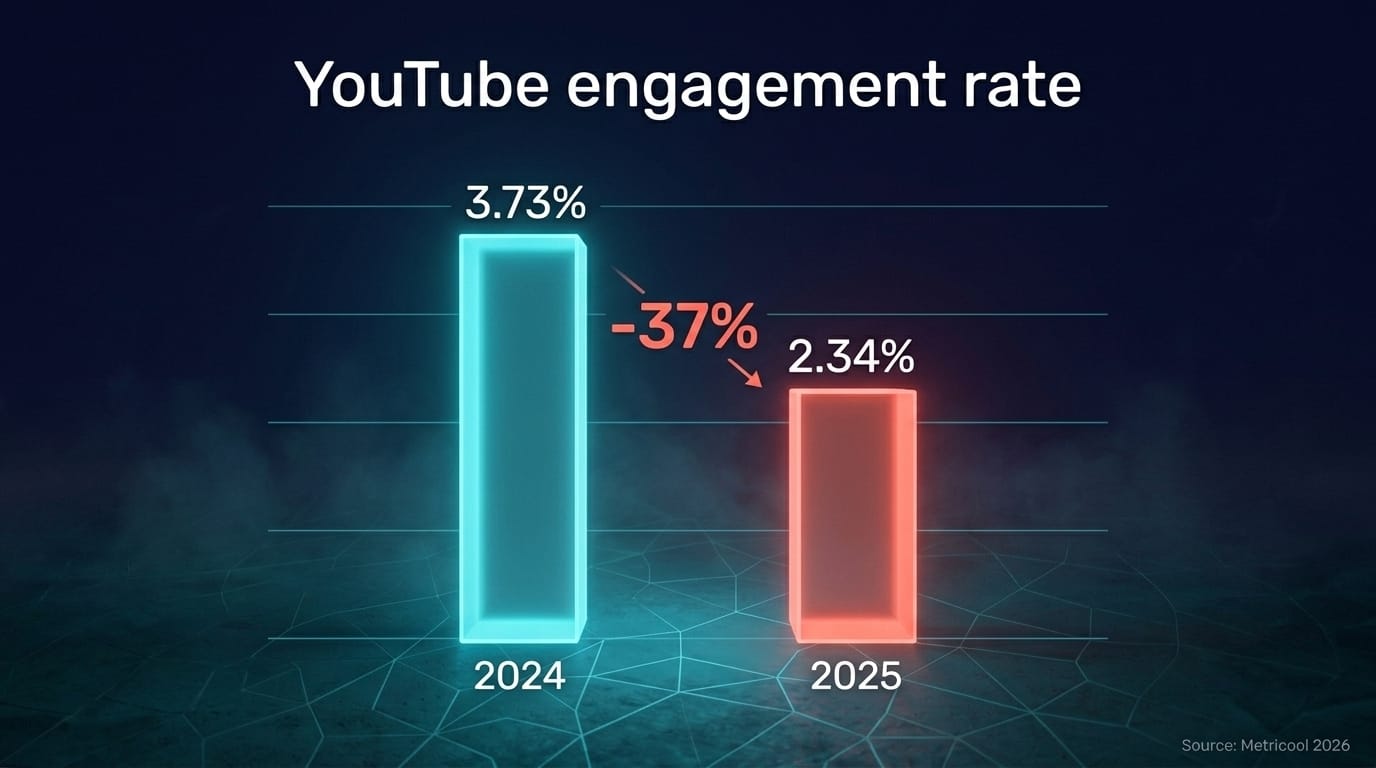
In 2025, average YouTube engagement rate fell to 2.34% — down from 3.73% the year before, a 37% drop (Metricool, YouTube Marketing Statistics 2026). The math is brutal: views are flat or shrinking for most channels, and YouTube Studio still tells you what happened without telling you why. The "why" lives in comments, in competitor patterns, in what a niche audience is asking for — and that's the gap free channel analyzers exist to fill.
We tested five of them. Four track public metrics — subs, views, keyword scores, ranking estimates. One reads what the audience is actually saying — across channels you don't own. That's a real category split, not a feature tier.
Key TakeawaysYouTube engagement dropped 37% between 2024 and 2025 (Metricool, 2026) — vanity metrics alone no longer signal channel health.86% of creators globally now use generative AI; 44% want it to surface content-performance insights (Adobe Creators' Toolkit Report, October 2025).Free tools split into 5 categories: SEO calculators (TubeRanker), audit-only checkers (HypeAuditor), public-stats trackers (Social Blade), AI niche scanners (NicheProwler), and competitor-comment intelligence (OneTube, via Spy Mode).For competitor-channel research specifically, OneTube's 7-day trial is the only option that ingests rival-channel comments automatically and surfaces what their audience is asking for.
What does a YouTube channel analyzer actually do?
A YouTube channel analyzer pulls data Google's Studio doesn't surface — public metrics on any channel, audience sentiment from comments, content gaps, or keyword performance. As of October 2025, 86% of creators worldwide use generative AI in their workflow, and 44% specifically want AI to "surface content-performance insights" (Adobe Creators' Toolkit Report, 2025). That's a lot of demand for tools that go beyond view counts.
The category splits into four jobs:
- SEO and discoverability — keyword research, tag extraction, thumbnail testing
- Audit and vanity stats — subscriber counts, fake-follower checks, growth charts
- Niche and competitor research — what is working in your space, who is gaining
- Audience-feedback intelligence — what your viewers (or your rivals' viewers) are actually asking for in comments
Most free tools do one of these well and skip the rest. YouTube Studio itself is a strong audit tool, a weak SEO tool, and intentionally blind to competitor data. That's where third-party analyzers come in.
In 2026, the most useful job — and the rarest one in free tools — is the fourth. Comments grew 38% year over year (Metricool, 2026) even as engagement rate fell, which means audiences are talking more, just spread thinner. Reading that signal is where the gap lives.
Why do free tools matter more in 2026?

Free analytics tools matter more now because creator economics got worse. 73% of full-time content creators reported burnout in the past year (Awin Group Creator Survey, via Spiralytics 2025), and 41% specifically struggle to maintain a posting schedule. Most can't afford a $299/month enterprise analytics seat, and most also can't afford to spend their analytics budget on the wrong tool.
Free tiers used to be marketing shells — locked behind a credit card after seven days. That changed in 2024 and 2025. Real free analysis is back on the table, partly because YouTube's July 2025 policy crackdown on AI-generated mass uploads (TechCrunch, July 2025) shifted the value of analytics tools from "post more, faster" to "post smarter, less."
What we see: Most free YouTube tools optimize for upload (SEO, tags, thumbnails). Almost none optimize for listening — what's actually being said in the comments under videos in your niche. That asymmetry is the opportunity. A free tool that reads competitor comments daily is more rare than a free tool that calculates keyword density, and it's usually more useful for content direction.
The bar for a free tool in 2026 isn't "does it exist." It's: does it tell you something YouTube Studio doesn't, on a recurring schedule, without forcing you to manually paste URLs every morning?
The 5 best free YouTube channel analyzers, tested
We tested 5 tools that meet the bar — they have a real free tier (not a 7-day trial), they pull data on channels you don't own, and they were operating as of May 2026. Here's how they compare on the dimensions that matter for channel analysis.
| Tool | Free tier | Competitor analysis | AI insights | Comment intelligence | Recurring monitoring |
|---|---|---|---|---|---|
| TubeRanker | Yes — most tools free | Partial (keyword overlap) | No | No | Partial |
| HypeAuditor | Limited (audit tools only) | Yes (audience quality) | No | No | No |
| Social Blade | Yes — extensive, no signup | Partial (public metrics) | No | No | Yes (auto-updated) |
| NicheProwler | Yes — basic analyzer | Yes (niche-level) | Yes (pay per full report) | No | Partial |
| OneTube | 7-day trial (no card to start) | Yes — Spy Mode | Yes (Pulse Reports) | Yes (every comment) | Yes (auto-sync) |
AI audit of any YouTube channel
Drop a competitor's URL. In 5–15 minutes, get the full breakdown of what's working, what's broken, and exactly what to film next.
- 🎯Their content ideasVideos their audience keeps asking for that they never made
- ⚠️Their weak spotsExact topics and formats where viewers tune out or push back
- 💬Audience questionsStraight from their comment section — your next 10 scripts
- 📋A ready content planRanked backlog of what to film next, pulled from real demand signal
- 🔥Their superfansWho's emotionally invested in the channel and what gets them to talk
Just a URL and an email. Report lands in your inbox.
Here's what each one actually does, in order from "useful as a calculator" to "useful as an ongoing intelligence stream."
TubeRanker
TubeRanker is the SEO calculator of the bunch. Free keyword research, tag extractor, and a one-shot channel audit that scores you against generic best practices. Good for finding low-competition keywords before you upload. Almost useless for understanding who's watching once you have. Pro features (bulk reports, historical rank tracking) sit behind a paid wall at tuberankerpro.com.
HypeAuditor
HypeAuditor is built for brands vetting influencers, not for creators analyzing themselves or their rivals. The free side gives you a Channel Quality Checker, a fake-subscriber audit, and a YouTube money calculator — one-off snapshots, no monitoring. Their real product (full audience demographics, brand safety) starts around $299/month with custom pricing. Useful if you've ever wondered whether a competitor is buying subs; not useful for content strategy.
Social Blade
Social Blade is the public-stats archive everyone's seen. No login, no quota — type any channel and you get subscriber/view/earnings estimates with daily history. Powerful for one thing (tracking who's growing) and weak for another (telling you why). Paid tiers start at $3.99/month for ad removal and exports. If your only question is "is this channel growing?" — Social Blade is the answer.
NicheProwler
NicheProwler is the youngest of the five and the most AI-forward. The free analyzer pulls public metadata and growth metrics on any channel. The full strategic AI report — niche positioning, monetization readiness, competitive benchmarking — is pay-per-use rather than subscription, which is unusually founder-friendly. Strong for one-off niche scans before launching a channel; not built for ongoing monitoring of an existing one.
OneTube
OneTube sits in a different category — and it's the one most relevant to anyone whose actual question is "what is my niche audience asking for, and what do my competitors' viewers want that they're not getting?" The 7-day free trial includes Spy Mode (add any public channel as a competitor and ingest its comments automatically), Pulse Reports (AI-generated channel breakdowns with audience questions, content gaps, and praise/criticism patterns), and a Weekly Digest that summarizes movement across tracked channels.
OneTube doesn't try to be an SEO calculator or a fake-sub auditor. It does one job: read every comment on the channels you care about, classify every comment by intent, and surface what's worth acting on.
How OneTube's Spy Mode changes free channel analysis

"If your competitor has 200 comments asking variations of 'but how does this work for small businesses?' — and they're not making that video — you are."
Spy Mode is the part most free analyzers don't have. In 2024, long-form YouTube videos averaged about 4 comments each, and Shorts averaged less than 1 (Statista, 2024). Multiply that by a niche of 200 active channels and 30 videos each per quarter, and you're staring at tens of thousands of comments per quarter that exist but no one is reading systematically.
That's the gap Spy Mode targets. You add a competitor's public YouTube channel to your OneTube workspace, marked as competitor rather than own. From that point forward, OneTube syncs their videos and comments on the same schedule your own channel uses (every 24 hours on Creator/Pro plans, twice daily on Studio and above). The Pulse Report that lands afterward includes a dedicated competitor_mentions section: what audiences are asking for under their videos, what they're criticizing, what content gaps the competitor hasn't addressed.
What we built it for: Most YouTube guidance says "watch your competitors' videos." That doesn't scale and it doesn't capture the audience signal. Watching the videos tells you what the competitor made. Reading the comments under those videos tells you what their audience wishes they'd made. That's where the content-gap opportunities live, and it's the data YouTube Studio cannot show you for channels you don't own.
For free-tier users, the 7-day trial is enough to add 5 channels (your own plus 4 competitors), generate 20 Pulse Reports, and decide whether the data justifies a $19/month Creator plan or higher. Cancellation during the 7-day window means no charge. Of the five tools in this comparison, OneTube is the only one whose free entry path is built around competitor comment analysis specifically, not metadata.
How do you pick the right free tool?
Match the tool to the question you're actually asking. If you're optimizing pre-upload (titles, tags, keywords), TubeRanker is fine and free. If you're a brand or agency vetting whether a creator's audience is real, HypeAuditor's free audit is the right starting point. If you want to track public growth of channels you don't control, Social Blade has done that better than anything else for over a decade.
If you're researching a niche before launching, NicheProwler's basic analyzer is a quick first pass — pay for the full AI report only if you're going to act on it.
If your question is "what does my niche audience actually want, and how can I learn from competitor channels without watching every video they post," OneTube's Spy Mode is the only free path in this list that answers it directly.
The honest version: most creators need more than one of these. SEO calculators are cheap or free, and so is public-stats tracking. The thing that's been hard to get for free is recurring competitor-comment intelligence — and that's the gap worth filling first, because it's the one that changes content direction, not just titles.
Frequently asked questions
Can I analyze another YouTube channel for free?
Yes — every tool in this comparison lets you analyze a channel you don't own to some degree. Social Blade gives the most public stats with zero signup. OneTube gives the deepest free competitor intelligence (comment-level) during its 7-day trial — no credit card required to start. HypeAuditor offers free one-off audits.
What's the best free YouTube channel analyzer?
It depends on the job. For SEO, TubeRanker. For public stats history, Social Blade. For audience fraud audits, HypeAuditor. For competitor comment intelligence, OneTube. No single tool wins all four — pick by the question you need answered.
Does YouTube Studio show competitor data?
No. YouTube Studio shows only channels you own and have logged into. That's by design — Google won't expose audience demographics or analytics from other creators' channels. Public-side data (subscriber counts, view counts, public comments) is what third-party tools work with.
How does OneTube's free trial work?
The fastest free entry is /audit — paste any channel URL at onetube.io/audit, get a Pulse Report by email, $0. The 7-day trial is the next step if you want to track 5 channels on a schedule. No credit card to start; OneTube collects a card only when you choose a paid plan. After 7 days, the trial converts only if you actively choose a paid plan; otherwise the account becomes read-only.
Can I export data from free YouTube analyzer tools?
Most free tiers limit exports. Social Blade exports require a paid plan ($3.99+/month). HypeAuditor exports are paid. TubeRanker free exports keyword lists in small batches. OneTube's PDF and CSV exports are gated to Pro plans and above; the trial doesn't include export. If exports matter for your workflow, factor that into the choice.
What to do next
If you've never run an analyzer on a competitor channel before, pick the simplest tool for your question and try one this week. For most creators that's either Social Blade (10 seconds, no signup, public stats) or OneTube's free Spy Mode audit — paste any rival's URL, get the Pulse Report on their audience by email. No card, no account needed.
- Track competitor growth → Social Blade
- Audit a single channel for fake subs → HypeAuditor free tools
- Find untapped niche before launching → NicheProwler
- Optimize a video before upload → TubeRanker
- Read what competitors' audiences are asking for → paste their URL at onetube.io/audit (free, no card, no account needed). Then upgrade to the 7-day trial if you want to track multiple rivals weekly.
The cheap part of YouTube analysis is data. The expensive part is paying attention to the right signal. Free tools are how you find out which signal is worth your time before you pay for more of it.
Sources:
- Metricool, YouTube Marketing Statistics 2026, retrieved 2026-05-13, https://metricool.com/youtube-statistics/
- Adobe, Creators' Toolkit Report 2025, retrieved 2026-05-13, https://news.adobe.com/news/2025/10/adobe-max-2025-creators-survey
- Awin Group Creator Survey 2024, via Spiralytics Content Creator Statistics 2025, retrieved 2026-05-13, https://www.spiralytics.com/blog/content-creator-statistics-2025/
- Statista, YouTube comments by video format 2024, retrieved 2026-05-13, https://www.statista.com/statistics/1466529/youtube-comments-by-video-format/
- TechCrunch, YouTube prepares crackdown on mass-produced videos, July 2025, retrieved 2026-05-13, https://techcrunch.com/2025/07/09/youtube-prepares-crackdown-on-mass-produced-and-repetitive-videos-as-concern-over-ai-slop-grows/
- TubeRanker official site, retrieved 2026-05-13, https://tuberanker.com/
- HypeAuditor free tools, retrieved 2026-05-13, https://hypeauditor.com/free-tools/
- Social Blade, retrieved 2026-05-13, https://socialblade.com/
- NicheProwler YouTube Channel Analyzer, retrieved 2026-05-13, https://www.nicheprowler.com/tools/youtube/youtube-channel-analyzer