
YouTube Competitor Analysis in 2026: The Spy Mode Playbook
Most YouTube competitor analysis stops at vanity metrics. You open a channel, scroll their videos, check view counts, peek at TubeBuddy, write down a few thumbnail patterns, and call it research. Then you wonder why your "data-driven" content plan keeps getting outshipped by people who seem to read minds.
They do not read minds. They read the comment section. That is where their competitors' audience tells them exactly what to make next, what is starting to bore them, and which products they are ready to buy.
"If your competitor has 200 comments asking variations of 'but how does this work for small businesses?' — and they're not making that video — you are."
This guide is the 4-layer playbook for doing it properly, with the layer almost nobody covers (Layer 3) treated as the main event.
Quick answer: What is YouTube competitor analysis in 2026?
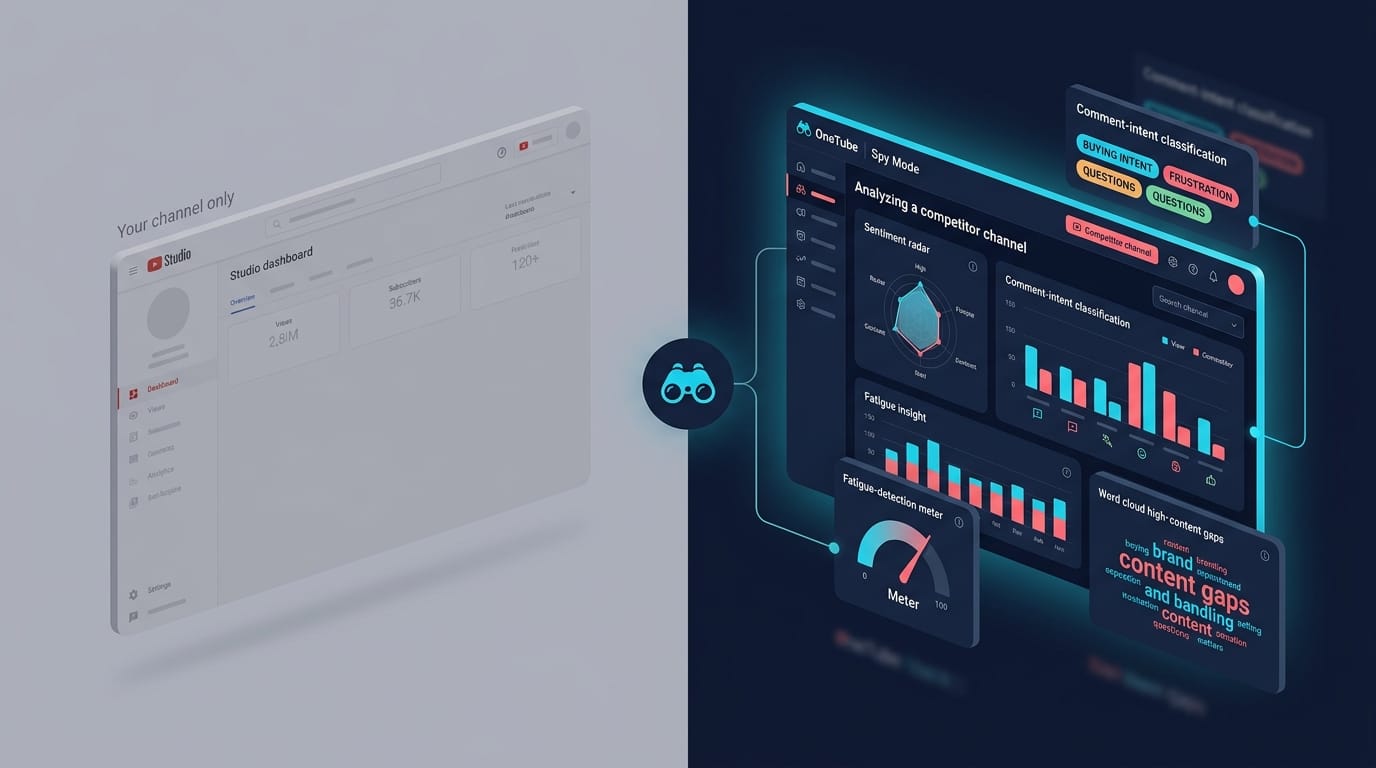
YouTube competitor analysis in 2026 is the practice of systematically reading another channel's signals - performance, format, audience response, and content gaps - to inform your own content decisions. The new edge is comment-side intelligence: extracting sentiment, buying intent, and fatigue markers from the comment sections of competitor videos. YouTube Studio shows you only your own channel; competitor analysis is the only way to see what is actually working in your niche before the algorithm tells you.
What is YouTube competitor analysis, really?
Strip the marketing language away and you are looking at four things on someone else's channel:
- Performance - views, frequency, posting cadence, subscriber trajectory
- Format - long-form vs Shorts mix, thumbnail style, hook pattern, length distribution
- Audience signal - sentiment, buying intent, fatigue markers, repeated questions in comments
- Content gaps - what their audience asks for in the comments that they have not made yet
The first two layers are what most analyses cover. Layer 3 is where almost everyone stops short, because it requires reading thousands of comments at scale. Layer 4 is what falls out of Layer 3 when you do it right. We will spend most of this post on those last two, because that is where the actual edge lives.
"External ideas, things that have worked for our competitors or even just other channels across YouTube. How can we come up with ideas based on things that have worked for them?"
Paddy Galloway, Creator Science Podcast Ep. 209
Why does YouTube Studio leave you blind to your competitors?
YouTube Studio shows you exactly one channel: yours. Its analytics tab will not, cannot, and never will tell you what is happening on your competitor's channel. The product was not built for it. Studio is a self-monitoring dashboard, not a market research tool.
That gap matters more in 2026 than it did three years ago. Engagement is decaying across the board. Statista pegs average YouTube engagement at 1.63% for channels under 15K subs in 2025, and the SociaVault 2026 benchmark across 75,000 channels shows the rate compressing as channels scale: nano (1K-10K) holds 5.23%, but macro (100K-500K) collapses to 2.12%. If you only watch your own retention curve, you cannot tell whether a dip is your problem or a sector-wide drift.
The fix is structural, not effort-based. You need a system that pulls in any public YouTube channel by URL, runs the same analytical pipeline you use on yourself, and surfaces the gaps. That is what we call Spy Mode at OneTube. No OAuth, no permission, no channel ownership required - if a channel is public, the comment section is public, and Layer 1 through Layer 4 is fair game.
Stop. Read that paragraph again if you are still picturing competitor research as "watching their videos on 2x speed." It is not. It is reading their audience.
Layer 1: What can you see on the surface, and why it is not enough?
The surface layer is scrape-able by anyone with a browser and 20 minutes. Useful as a baseline. Insufficient as a strategy.
- Upload cadence: how many videos per week, what days, what times
- Length distribution: long-form vs Shorts ratio, average duration
- Top videos by view count: their hits, and the gap between hits and median
- Subscriber growth trajectory: trend slope over 90 days, not raw count
- Playlist structure: how they organize series, which playlists drive cross-views
You can pull all of this manually. You can also burn an hour per competitor and still miss the why. Surface metrics tell you what landed. They do not tell you what their audience felt about it, or what their audience wanted next.
This is the layer where Social Blade, TubeBuddy, and vidIQ live. Useful, table-stakes, and not where the edge is.
Layer 2: How do you decode their format mix and hook patterns?
Layer 2 is the first place where careful observation beats raw scraping. You are looking at format choices that the channel made deliberately:
- Thumbnail patterns: face on left vs right, text size, color palette, contrast ratio. Sprout Social's 2026 competitive guide notes that 9 of 10 top-viewed YouTube videos use custom high-contrast thumbnails - so the question is not "are they custom" but which specific contrast palette is hitting in your niche.
- Title structure: question titles vs declarative, number-led vs claim-led, length in characters
- Hook windows: what happens in the first 0-30 seconds, because that is where you lose them. Retention Rabbit's 2025 audience retention benchmark found casual viewers drop off at 60% in the first 30 seconds if intros are slow. Dedicated learners drop at 35%. Same channel, different audience modes.
- Format experiments: when did they pivot to Shorts, what happened to long-form views after. The arXiv "Shorts on the Rise" study tracked 250 creators and found long-form views significantly decreased post-Shorts adoption. This is a fatigue mechanic you can detect on competitors before they admit it.
Watching format moves in real time tells you what your niche is testing. But it still does not tell you whether the test worked for the people who watched. For that, you need to listen to their audience.
Layer 3: How do you spy on competitor YouTube channel comments at scale?
This is the layer almost nobody covers, and it is where Spy Mode earns its name. Social listening tools track mentions. OneTube reads the whole comment section. The comment section of a competitor's video is a free, public, structured dataset of how their audience actually feels. Most analyses gesture at it with one sentence ("check the comments for ideas") and move on. We are going to do the opposite.
Comments are scarcer than they were two years ago. Socialinsider's 2026 benchmarks (synthesized with Posteverywhere's cross-platform analysis) show comments per post falling 24% on TikTok and 16% on Instagram year over year. YouTube is following the same drift. Fewer comments means more signal per comment - the people who do comment are self-selecting for high intent.
Reading audience sentiment from comments
Sentiment is not "are they happy or sad." Sentiment on YouTube competitor channels is:
- Frustration patterns ("I came here for X, got Y") - tells you what their audience expected but did not receive
- Praise patterns ("the part at 7:32 finally made it click") - tells you which segments hit, with timestamp precision
- Confusion ("wait, but what about Z?") - tells you the question their video raised and did not answer
- Tonal drift across a series - the same channel's comments going from enthusiastic to "this is getting repetitive" across 5 videos in a row
OneTube's Pulse Reports run intent and emotion classification on every public comment on a tracked channel, including channels you mark as type='competitor'. The output is an aggregate sentiment profile you can read in 60 seconds instead of scrolling for an hour. Studio can do none of this for someone else's channel. Nor for yours, actually - Studio's comment tab is a moderation queue, not an analytics surface.
Spotting buying-intent moments
This is the most underused signal on YouTube. People type their purchase intent into competitor comment sections all the time:
- "Where can I buy this?"
- "Does this work for [my use case]?"
- "Which one would you recommend for someone with [my situation]?"
- "What is the alternative if I don't want to pay for X?"
- "Is there a free version of this?"
If a competitor is in your niche and their comments are full of "which one should I get" questions that they never answer in a video, you have just been handed a content brief and a product brief at the same time. Spy Mode tags these comments automatically. You read the cluster, not the comments.
Worth saying out loud: this is the signal that ties to monetization signals. Audience buying intent in comments is the leading indicator for sponsorship value, affiliate revenue, and your own product fit. Sprout Social's 2025 Impact of Social Media Report found that 67% of marketing leaders are confident social drives brand awareness but far fewer can tie social activity to specific outcomes. Reading buying intent directly is one of the few ways to close that gap on YouTube.
Comment mining youtube for content ideas
Once you have sentiment and intent classified, the next step is theme clustering: what topics keep coming up across a competitor's recent 20 videos that they have not made a dedicated video about yet.
A typical pattern: a finance channel posts 20 videos about index funds. Their comments are full of "but what about tax-loss harvesting at the end of the year?" The channel has never made a video about tax-loss harvesting. You now know what to make this week, and you know the framing the audience wants because they wrote it themselves.
This is comment mining youtube, done at scale. Manual version: 2 hours per competitor and you miss 80% of the signal. Automated version: 5 minutes and you read the themes sorted by frequency.
Spotting fatigue before the channel does
Format fatigue is real, measurable, and detectable from outside the channel. Three patterns to watch for on a competitor:
- Sentiment drift across a format series: comments getting shorter, less enthusiastic, more "another one of these" over 5-10 consecutive videos
- Question repetition: the same audience question appearing in comments across multiple videos in a row, suggesting the channel is not answering it
- Retention drop signals in comments: explicit "the intro was too long" or "I skipped to 3:00" comments showing up more often
This is audience fatigue detection and it is the early warning system that lets you pivot before your niche pivots. A competitor's audience usually starts complaining 3-6 videos before the channel notices and adjusts. If you read their comments, you adjust first.
The same mechanism reads as format fatigue when it is the format itself that is decaying (Shorts vs long-form, talking head vs B-roll, listicle vs deep dive), and as retention drop signals when comments start naming specific timestamps where they tuned out. All three are visible in the comment stream if you classify it properly.
Layer 4: How do you turn competitor comments into your content calendar?
Layer 4 is the operational layer. You have sentiment, intent, themes, and fatigue markers from 3-5 competitors. Now what.
The workflow:
- Cluster unanswered questions across all tracked competitors in your niche. Sort by frequency. The top 10 are your next 10 video briefs.
- Tag buying-intent comments by product or solution category. If 40 people across 4 channels asked "what is the alternative to X" and you can review X's alternatives credibly, that is a sponsorship-ready video.
- Track sentiment delta between competitor A and competitor B on the same topic. If A's audience loves how they explain it and B's audience finds it confusing, you have your positioning angle ("the X explainer that finally makes sense").
- Read fatigue markers as opportunity: if a competitor's audience is bored of their format, you have a 6-12 week window to ship something fresher in the same content space.
This is what we mean when we say comments are creative briefs, not just engagement metrics. The brief writes itself. You just have to read it.
For a deeper walkthrough of pulling unanswered audience questions across multiple channels, we wrote the content-gap workflow here. For the broader "what do viewers actually want" angle, our audience-intent decoding post is the companion read.
How does Spy Mode compare to YouTube Studio, vidIQ, and TubeBuddy?
| Capability | YouTube Studio | vidIQ / TubeBuddy | OneTube Spy Mode |
|---|---|---|---|
| Own-channel metrics | Full | Yes, augmented | Yes |
| Competitor audience signal (public) | None | Limited (subs, views) | Full — comment intent, sentiment, gaps |
| Read competitor comments at scale | Not for other channels | No | Yes, classified |
| Sentiment + intent on competitor comments | No | No | Yes (Pulse Reports) |
| Buying-intent extraction from comments | No | No | Yes |
| Format-fatigue / retention-drop signals from comments | No | No | Yes |
| Content-gap surfacing across multiple channels | No | No | Yes |
| Channel onboarding | OAuth required (own channel) | OAuth | URL only - any public channel |
| Pricing | Free | $9-$99/mo | $9-$99/mo (7-day trial) |
AI audit of any YouTube channel
Drop a competitor's URL. In 5–15 minutes, get the full breakdown of what's working, what's broken, and exactly what to film next.
- 🎯Their content ideasVideos their audience keeps asking for that they never made
- ⚠️Their weak spotsExact topics and formats where viewers tune out or push back
- 💬Audience questionsStraight from their comment section — your next 10 scripts
- 📋A ready content planRanked backlog of what to film next, pulled from real demand signal
- 🔥Their superfansWho's emotionally invested in the channel and what gets them to talk
Just a URL and an email. Report lands in your inbox.
If you only need own-channel metrics, Studio is fine and free. If you need keyword and tag suggestions for your own uploads, vidIQ and TubeBuddy compete head to head and either works. If you need to read your competitors' audience at scale and turn it into a content calendar, that is what Spy Mode was built for. The three are not really substitutes; they cover different sides of the same channel.
How do you run a 30-minute Spy Mode competitor sweep?
For a creator with 3-5 competitors to track, here is the workflow:
- Pick 3-5 competitor channels (5 minutes). Direct (same topic, similar size), aspirational (your topic, 5-10x bigger), and adjacent (different angle on your topic). Skip vanity comps that get 50M views per video if you are at 10K subs - the audience profile is too different.
- Paste channel URLs into OneTube (2 minutes). Mark each as
type='competitor'. No OAuth, no permission from them, no signup ceremony. - Wait for the initial Pulse Report to generate (10-15 minutes for a full channel pass). The system pulls comments across recent videos and classifies them.
- Read the aggregate sentiment + intent breakdown (5 minutes per channel). Look for: top audience questions, buying-intent clusters, fatigue markers, top recurring themes.
- Export the unanswered-questions list as your content backlog (3 minutes).
- Set Pulse Reports to refresh weekly so you catch new patterns as they emerge.
The whole sweep takes longer than the active reading time because the AI processing runs in the background. You start it, get coffee, come back and read the report. After the first sweep, weekly refreshes take 5 minutes of reading.
What are the most common YouTube competitor analysis mistakes?
Five patterns we see creators repeat:
- Tracking only vanity metrics: views and subs are lagging indicators. By the time a competitor's view counts have shifted, the strategic move that caused it is already months old.
- Picking the wrong competitors: tracking a 5M-sub channel when you have 5K subs gives you an aspiration board, not a research tool. Audience profile mismatch is too wide.
- Ignoring comment-side signals: this is the whole point of the post. Skipping Layer 3 means skipping the only layer your competitors cannot easily defend against.
- One-shot research: a competitor sweep done once and never again is a snapshot, not intelligence. Niches drift on monthly cadence; your monitoring should too.
- Copying instead of learning: the goal of competitor analysis is to find what their audience wants that they are not delivering. Not to clone their format. Cloning loses every time.
FAQ
What is YouTube competitor analysis?
YouTube competitor analysis is the structured practice of monitoring other channels in your niche to inform your own content, format, and timing decisions. The 2026 version goes beyond view counts into comment-side intelligence: sentiment, intent, fatigue, and content gaps surfaced from competitors' audience conversations.
Can you legally analyze a competitor YouTube channel?
Yes. Public YouTube channels are public. Reading their videos, taking notes on their format, and reading their comment sections is the same as any market research. You do not need permission from the channel owner. OneTube's Spy Mode uses only public channel data, no OAuth into the competitor's account.
How do you spy on a competitor YouTube channel without subscribing?
Paste the channel URL into an analytics platform that supports public-channel monitoring. OneTube, for example, accepts any public channel by URL and runs the same Pulse Report pipeline on it that you would run on your own channel. No subscribing required, no notification to the channel owner.
What is comment mining on YouTube?
Comment mining is the systematic extraction of structured signal from a video's comments: audience questions, buying intent, sentiment patterns, recurring themes, fatigue markers. Manual mining is possible but slow. AI classification makes it practical at the scale of multiple channels.
How do you detect audience fatigue on a YouTube channel?
Audience fatigue shows up in three observable patterns: sentiment drift across consecutive videos in the same format (comments getting less enthusiastic), repeated audience questions that the channel is not answering, and explicit timestamp-skip comments. All three are readable from the comment stream of any public channel.
Is there a free tool for YouTube competitor analysis?
For surface metrics (views, subs, cadence), Social Blade is free. For comment-side intelligence (sentiment, intent, fatigue, content gaps), the work is heavier and most tools charge for it. OneTube's free Spy Mode audit gives you a public-channel taste — paste any competitor URL, get a Pulse Report by email. No card, no account needed. The 7-day trial (also no card) is the upgrade for ongoing multi-channel tracking.
Does OneTube replace vidIQ for competitor analysis?
For comment-side competitor intelligence, yes - vidIQ does not do this. For keyword and tag suggestions on your own uploads, vidIQ is the tool that does that job. We see creators run both: vidIQ for upload-side optimization, OneTube for niche and competitor monitoring. If you have to pick one, pick the one that solves the bigger gap.
The takeaway
If you got this far: the layer most YouTube competitor analyses skip is the only layer your competitors cannot easily defend. Surface metrics are public. Format choices are visible. But reading 5,000 comments across 3 competitors every week is operationally hard enough that almost nobody does it manually, and Studio refuses to even try.
That is the gap Spy Mode was built to close. Run a free Spy Mode audit on your biggest competitor right now — no card, no account needed, just a URL and an email. The Pulse Report lands in your inbox in ~15 minutes. If it does not surface at least three things you did not know about their audience, the post was not useful enough and that is on us. The 7-day trial (also no card) is the upgrade for ongoing multi-channel tracking.