
Best YouTube Reporting Tools for Agencies in 2026 (Honest 7-Tool Comparison)

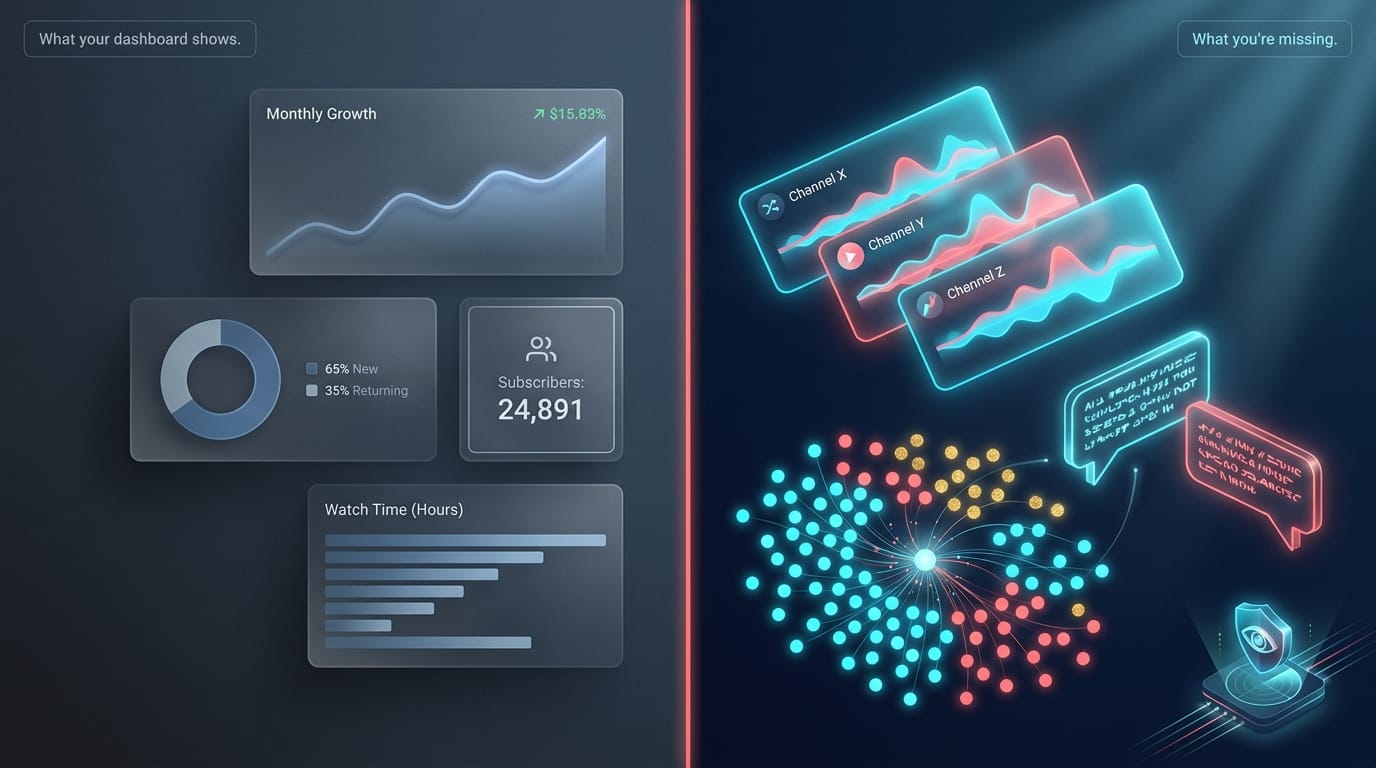
Quick disambiguation up top: this article compares analytics and client-reporting tools for marketing agencies managing YouTube channels — not YouTube's abuse-reporting system. (If you need to flag a video, channel, or comment for guideline violations, that's done through YouTube Help.)
The agencies who report on YouTube fall into one of two camps in 2026. Camp A pulls views and watch time from YouTube Studio, drops them into a white-label PDF, and sends it on the first of the month. Camp B is starting to ask why the report keeps growing in length but not in answers — why metrics moved, what audiences are asking for, what competitor channels are doing. The first camp uses every tool below. The second one is starting to realize most of those tools are answering the wrong question.
Six of those tools share the same blind spot for a reason most articles don't mention: the YouTube Analytics API only returns data for channels your client owns. That's a product wall set by Google. You can pay AgencyAnalytics $500/mo or Whatagraph €399/mo and still not see a single comment under your client's biggest competitor's last video. One tool in this comparison built its ingestion outside that wall.
We tested seven YouTube reporting tools across pricing, white-label depth, AI insight quality, and one capability almost nobody has: visibility into competitor channels and their comment threads.
Key Takeaways81% of US agencies expect YouTube spend to stay flat or rise in 2026, yet only 22% feel they have visibility into creator efforts (Pixability Global Agency Study 2026).The dominant agency reporting platforms — AgencyAnalytics, DashThis, Whatagraph, GreyMetrics — all pull from the YouTube Analytics API, which is OAuth-gated to channels your client owns. That's a hard product wall set by Google, not a feature gap. None of them can pull public competitor-channel data; the wall is structural, not roadmap.Comment-level sentiment, audience-question extraction, and AI-generated commentary on why metrics moved are absent from every general reporting tool in this comparison.If your client work spans multiple platforms (YouTube + Instagram + TikTok + LinkedIn): use a multi-platform tool (AgencyAnalytics, DashThis, Whatagraph) for the cross-channel deliverable plus a YouTube-vertical layer for the strategic insight. If your client work is YouTube-heavy or YouTube-only: OneTube on Agency Starter+ can serve as a standalone — branded PDF reports plus the competitor and comment intelligence in one tool.
Why do agencies need a YouTube reporting tool in 2026?
Because YouTube is no longer a side-channel in client work, and the gap between what creators spend and what agencies can prove is widening.
US agencies expect YouTube spend to stay flat (38%) or increase (43%) into 2026, with only 4% planning a decrease (Pixability 2026 Global Agency Study). Two-thirds (67%) of US agencies plan to lean on YouTube Shorts in 2026, up from 50% a year earlier. Combine that with US creator ad spend projected to hit $43.9B in 2026 (CreatorIQ State of Creator Marketing 2026) and the agency mandate is obvious: prove the YouTube line item is working.
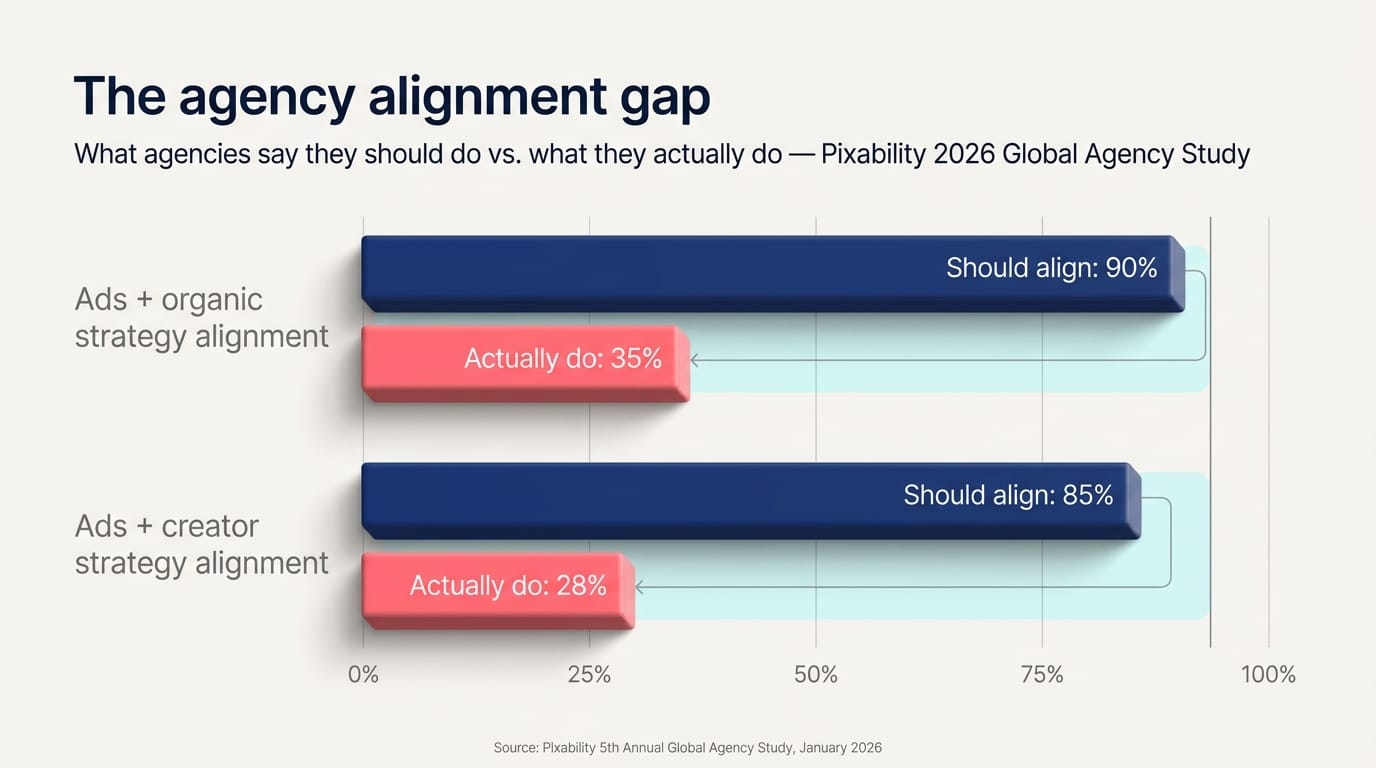
The problem is most agencies can't. Pixability's research found that only 22% of ad teams have visibility into creator efforts, and only 24% have insight into brands' organic YouTube strategy. Even more telling, 90% of agencies say their ads and organic strategies should align — but only 35% actually do. That's not a creative-side gap. That's a reporting one.
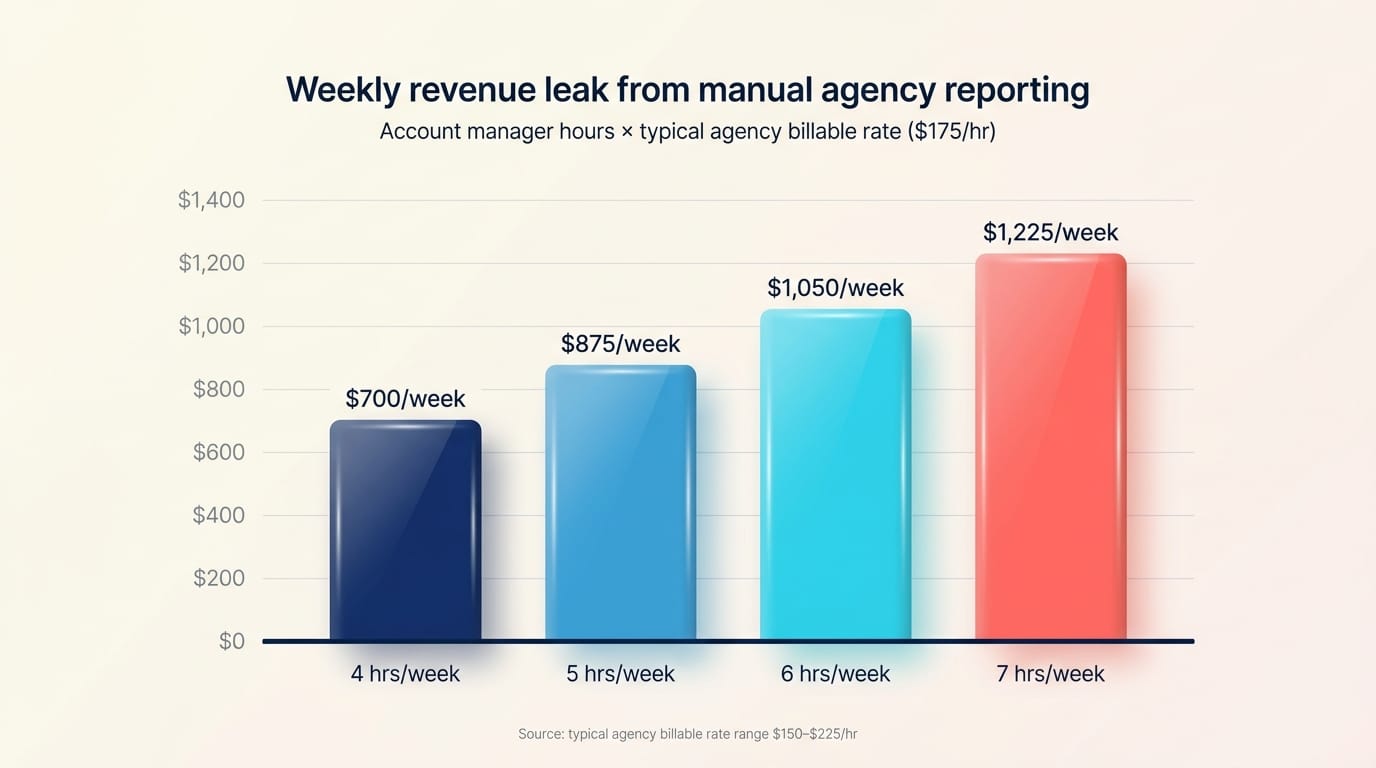
Reporting also drives retention. 70% of agency leaders surveyed by AgencyAnalytics in 2025 said client reporting plays a critical role in keeping clients (AgencyAnalytics 2025 Marketing Agency Benchmarks). And reporting is expensive: account managers typically spend four to seven billable hours per week on client reports, and most digital agencies bill in the $150–$225 per hour range. That's $600–$1,500 per AM per week walked out the door to formatting screenshots.
So agencies need a reporting tool. The question is which capability you optimize for — speed of deliverable, white-label polish, or strategic insight your client hasn't already seen.
What does a complete YouTube agency report actually need?
A useful YouTube client report has four layers. Most reporting tools deliver one or two and call it done.
Layer 1 — Performance metrics. Subscribers, views, watch time, retention, top videos. Every tool in this comparison handles this; it's table stakes. Most agencies already over-report here.
Layer 2 — Context and explanation. Why watch time dropped 8% last month. Whether a viral spike came from a thumbnail change or external traffic. What format the audience responded to. This is where most reports fall apart — they show what without explaining why, which is exactly the problem 40% of clients cite when they admit they don't read the full report (AgencyAnalytics 2024 Client Reporting Trends).
Layer 3 — Audience intelligence. What viewers are asking for, what they're frustrated about, what content gaps they're hinting at in comments. This is the next-month-content-direction layer, and it's the one that materially affects channel growth. Almost no reporting tool captures it. We dug into the mechanics of decoding this signal in our piece on what YouTube viewers actually want.
Layer 4 — Competitive context. What competitor channels in your client's niche are publishing, what their audiences are responding to, and where your client has gaps relative to rivals. Native YouTube Studio is structurally blind to this — Google won't let agencies see other channels' analytics. Third-party reporting tools inherit the limitation.
"If your competitor has 200 comments asking variations of 'but how does this work for small businesses?' — and they're not making that video — you are."
The dominant tools in this comparison ship Layer 1 perfectly and Layer 2 inconsistently. None ships Layer 3 or Layer 4. That isn't a small gap — it's the entire reason a client might disagree with you about what to do next month.
The 7 YouTube reporting tools compared
1. AgencyAnalytics
The default for small-to-mid marketing agencies. AgencyAnalytics (agencyanalytics.com) connects to YouTube Studio via OAuth, pulls 15+ metrics, and lets you build client dashboards across 85+ marketing platforms in one place.
- Pricing: $20/client/month on the Core annual plan, custom Enterprise tiers at 25+ clients.
- White-label: Full — logo, color scheme, custom domain, branded email.
- AI: Ask AI, AI Summary, AI insights commentary. Recently added MCP access to ChatGPT and Claude.
- Strengths: Massive platform integrations, mature white-label client portal, branded report templates.
- Weaknesses: Per-client pricing scales linearly (10 clients = $200/mo, 25 = $500). G2 reviewers note the May 2025 price doubling ($10 → $20/client) and 2–3 day integration lag complaints (G2). No competitor channel data. No comment sentiment.
- Best for: Small-to-mid agencies under ~50 clients who need a polished white-label deliverable across multiple platforms.
2. DashThis
A dashboard-first alternative aimed at solo agencies and freelancers. DashThis (dashthis.com) leans hard into pre-built templates and one-click PDF exports.
- Pricing: $44/mo Individual (3 dashboards), $139/mo Professional (10), $279/mo Business (25), $429/mo Standard (50).
- White-label: Professional tier and above — logo, color, custom domain, no DashThis branding on emails.
- AI: AI Insights generates Summary, Opportunities, Wins, Issues automatically. AI Insights PRO adds conversational chat.
- Strengths: Cleanest setup experience in the group, generous annual discounts (~$120–$840 off), fast PDF exports.
- Weaknesses: G2 reviewers describe reports as "long vertical scrolls that look homemade" and flag limited data blending. You often need to duplicate dashboards per report type, which drives effective cost up. No competitor channels. No comment analysis.
- Best for: Solo agencies and freelancers under 10 clients who want speed over depth.
3. Whatagraph
A mid-to-enterprise platform built around heavy multi-channel aggregation. Whatagraph (whatagraph.com) pulls 80+ YouTube metrics and supports template-driven cross-platform reports.
- Pricing: Start €199/mo annual, Boost €399/mo annual (most popular), Max custom. Annual commitment minimum ≈ $2,748/yr.
- White-label: Boost tier and above — full custom branding plus custom report domain.
- AI: Whatagraph IQ generates report summaries and chat commentary on all plans; IQ+ on Boost+ enables custom prompts and dimensions.
- Strengths: Most polished cross-channel report experience in this group. Strong BigQuery and Looker Studio pass-through.
- Weaknesses: Annual-only commitment locks small agencies out. G2 reviewers cite widget size restrictions, glitchy co-editing, aggressive sales calls (G2). No competitor data. No comment analysis.
- Best for: Mid-to-large agencies (15+ clients) running multi-channel campaigns where YouTube is one platform of many.
4. AgencyDashboard.io
A keyword-and-rank-tracking-heavy tool that includes YouTube reporting as part of a broader SEO suite. AgencyDashboard (agencydashboard.io) reports on views, watch time, subs gained, revenue for monetized channels, traffic sources, and per-video drilldown.
- Pricing: ≈$30–35/mo Freelancer (annual), $100–125/mo Agency, $195/mo Agency Plus.
- White-label: Included from Freelancer tier.
- AI: Limited — usage quotas on content tools, no real AI commentary on reports.
- Strengths: Cheapest white-label tier in the comparison. Strong SEO integration if you're also doing keyword work.
- Weaknesses: YouTube is not the primary product focus. Comment "sentiment" is reduced to like/dislike ratio plus comment counts — no NLP. Few G2 reviews in 2024–2025 raise questions about active development.
- Best for: SEO-led freelancers running combined SEO + YouTube reporting on a tight budget.
5. GreyMetrics
A budget white-label dashboard tool recently acquired by ClickTech. GreyMetrics (greymetrics.com) pulls standard channel-level YouTube metrics with hourly refreshes.
- Pricing: Startup $49/mo (10 clients, 2 team), Agency $159/mo (40 clients, 10 team), Enterprise custom.
- White-label: Yes, all tiers.
- AI: Not prominent in current marketing materials.
- Strengths: Cheapest scale-up path — 40 clients for $159/mo flat versus AgencyAnalytics' $800/mo at the same client count.
- Weaknesses: Sparse G2/Capterra review base. ClickTech acquisition adds roadmap uncertainty. No competitor data, no comment analysis, no Pulse-style AI commentary.
- Best for: Budget-conscious small agencies that want white-label without per-client billing.
6. Looker Studio
Google's free dashboard tool (formerly Google Data Studio), with a $9/user/month Pro tier. Looker Studio (cloud.google.com/looker-studio) connects to YouTube Analytics natively and supports custom dashboards.
- Pricing: Free; Pro $9/user/month.
- White-label: Partial — logo and colors yes; "powered by Google" branding stays; no custom domain even on Pro.
- AI: Gemini integration on Pro — formula assistant, conversational analytics, slide generation.
- Strengths: Free for your client's own channels. Strong integration with Google Ads, Search Console, GA4.
- Weaknesses: 38% of 2025 reviewers flag dashboard performance issues at scale (Swydo's Looker Studio limitations write-up). 5-source blend cap. March 2025 quotas restrict scheduled email recipients. No competitor data, no comment intelligence.
- Best for: Solo agencies, in-house teams, or agencies under 10 clients comfortable with maintenance burden.
7. OneTube
YouTube comment intelligence built into a reporting layer. OneTube (onetube.io) doesn't compete with the six above on cross-platform aggregation — it does the job the OAuth wall keeps them out of: reading what audiences are actually asking for on channels your client doesn't own.
- Pricing: Creator $9/mo (5 channels), Pro $19/mo (15), Studio $49/mo (40 channels plus white-label), Agency Starter $99/mo (100 channels plus isolated workspaces). Annual billing ~20% lower.
- White-label: Yes on Agency Starter and above — branded PDF Pulse Reports with custom logo and brand colors, no OneTube branding on the client-facing deliverable. Configured in the dashboard's branding settings.
- AI: Pulse Reports run on our AI stack with reasoning-class models — generating a Key Takeaway, Content Recommendations, Audience Insights, Risk Areas, and Opportunities. Not just charts, actual prose commentary on why metrics moved.
- Spy Mode (the differentiator): Any public YouTube channel can be added as a competitor. The same sync pipeline runs against it. Pulse Reports include a dedicated competitor mentions block surfacing what rival audiences are asking for. No other tool in this comparison does this.
- Comment intelligence: Every comment is classified by intent and emotion across multiple dimensions. Verbatim top audience questions, top criticism themes, top praise, and top content ideas surface in each Pulse Report.
- Strengths: Only tool in this comparison that reads what audiences are saying. Competitor-channel intelligence native to the product. White-label PDF reports on Studio and Agency tiers. PDF + CSV export from the Pro tier upward.
- Weaknesses: YouTube-only — no Facebook, Instagram, TikTok aggregation. No client-facing portal or custom-domain reports — clients receive exported PDF/CSV files, not branded login access. Agency tier is required for white-label and for isolated workspaces.
- Best for: YouTube-focused agencies that want a single tool for branded client reports plus competitor and comment intelligence. Also fits multi-platform agencies as a YouTube-depth complement to AgencyAnalytics, DashThis, or Whatagraph.
Comparison matrix
| Tool | Entry $/mo | YouTube depth | White-label | AI commentary | Competitor channels | Comment sentiment | Multi-platform | Best for |
|---|---|---|---|---|---|---|---|---|
| AgencyAnalytics | $20/client | High | Yes | Yes | No | No | Yes (85+) | Small-mid agency, white-label deliverable |
| DashThis | $44 | Mid-high | Yes (Pro+) | Yes | No | No | Yes (30+) | Solo/small agency |
| Whatagraph | ≈$215 | High | Yes (Boost+) | Yes | No | No | Yes (80+) | Mid-large enterprise agency |
| AgencyDashboard.io | $30 | Mid | Yes | Limited | No | Like/dislike only | Yes | SEO-led freelancer |
| GreyMetrics | $49 | Mid | Yes | Limited | No | No | Yes (20+) | Budget white-label small agency |
| Looker Studio | Free / $9 | Mid | Partial | Yes (Pro) | No | No | Limited | Solo / in-house, budget zero |
| OneTube | $19 / $199 (Agency Starter) | Highest | Yes (Agency+) | Yes (AI commentary) | Yes (Spy Mode) | Yes (full NLP) | No (YouTube-only) | YouTube-focused agencies; or complement to multi-platform tool |
AI audit of any YouTube channel
Drop a competitor's URL. In 5–15 minutes, get the full breakdown of what's working, what's broken, and exactly what to film next.
- 🎯Their content ideasVideos their audience keeps asking for that they never made
- ⚠️Their weak spotsExact topics and formats where viewers tune out or push back
- 💬Audience questionsStraight from their comment section — your next 10 scripts
- 📋A ready content planRanked backlog of what to film next, pulled from real demand signal
- 🔥Their superfansWho's emotionally invested in the channel and what gets them to talk
Just a URL and an email. Report lands in your inbox.
Sources: vendor pricing and integration pages, verified May 2026.
Why do general reporting tools miss competitor channels and comments?
The reason is structural, not effort. Every tool above except OneTube pulls YouTube data through the YouTube Analytics API, which is OAuth-gated and only returns data for channels the authenticated user owns. That's a hard wall set by Google — agencies can't pass it with a paid plan.
Comment data is even more constrained. The YouTube Data API returns comment text but not aggregated sentiment, not topic clusters, not emotion classification. To go from a raw comment feed to "your audience is asking for tutorial-style explainers, not opinion videos" requires a separate NLP pipeline and a meaningful AI cost per channel. General reporting tools have correctly decided not to build that — their customers run 30+ clients across 10+ platforms, and YouTube isn't the dominant signal.
The result is a shared blind spot. AgencyAnalytics, DashThis, Whatagraph, GreyMetrics, and Looker Studio all stop at "your channel's metrics." If your client report needs to answer what are competitor audiences asking for that you're not making — the question that drives the next-month content decisions — you have to either skip it or use a tool built for that specific job. We walked through the mechanics of finding those gaps in our content-gap analysis pillar.
"YouTube Studio shows your client's metrics. OneTube shows what your client's competitor's audience is asking for — verbatim, across every channel you track. The audience-voice section a dashboard can't produce."
Where does OneTube fit in your reporting workflow?
There are two valid setups, depending on whether your client work spans multiple platforms or stays focused on YouTube.
Setup A — OneTube standalone (YouTube-focused agencies)
Setup A works when reading competitor audiences IS the agency deliverable — not when reporting on your client's own channel is the deliverable; that's already commodity work. For agencies whose retainers are YouTube-heavy or YouTube-only and where the strategic question "what should we make next month" is what clients pay for, OneTube on Agency Starter ($199/mo) handles the full workflow without a second tool. The Agency tier includes white-label PDF Pulse Reports (custom logo, brand colors, no OneTube branding on the deliverable), isolated workspaces per client, the Spy Mode competitor pipeline, and the comment intelligence layer in one place. Clients receive a branded PDF report each cycle; you spend the saved hours on strategy instead of formatting.
This setup makes sense when YouTube is the primary or only platform in the retainer — creator-economy agencies, channel-management consultancies, YouTube-first studios.
Setup B — OneTube as YouTube-depth layer (multi-platform agencies)
If your client work spans YouTube plus Instagram, TikTok, LinkedIn, paid media, or SEO, OneTube doesn't replace a multi-platform aggregator — we don't pull non-YouTube data. The pairing that works in this case:
- Day 1–25. Your multi-platform tool (AgencyAnalytics, DashThis, Whatagraph) collects metrics from every channel your client runs, including YouTube Studio. OneTube runs in parallel on YouTube: ingests your client's own channels plus competitor channels you've added to the workspace.
- Day 26–28. You generate a Pulse Report from OneTube. The report contains the AI-generated Key Takeaway, top audience questions mined from comments, top content ideas the audience is hinting at, top criticism themes, and the competitor-mentions block showing what rival audiences are talking about that your client hasn't addressed.
- Day 29–30. Your multi-platform tool produces the cross-channel client deliverable. You insert OneTube's Pulse PDF as a YouTube-strategy appendix — or paraphrase the top three audience-direction findings into the executive summary so the headline insight is visible without scrolling.
- Monthly meeting. Your client gets cross-platform metrics from the multi-platform tool plus the YouTube-specific strategic direction from OneTube's findings. That second half is what drives next-month content decisions.
Worth noting on plan choice: workspaces only exist on Agency Starter ($199/mo, 5 workspaces) and up. If you're managing fewer than 25 clients and don't need workspace isolation, Studio at $99/mo for 25 channels covers small portfolios — but white-label is an Agency-tier feature, so client-branded deliverables require Agency Starter or higher. The trial is 7 days with no credit card required to start, account converts to read-only if you cancel inside the window.
What does it actually cost at agency scale?
The pricing models diverge sharply once you hit real client counts. Below is the math at 5, 10, and 25 clients, using publicly listed entry tiers where each tool can technically cover that load.
| Tool | 5 clients | 10 clients | 25 clients | Notes |
|---|---|---|---|---|
| AgencyAnalytics | $100/mo | $200/mo | $500/mo | Per-client, annual billing |
| DashThis | $44/mo | $139/mo | $279/mo | Tiered by dashboards |
| Whatagraph | ≈$215/mo | ≈$215/mo | ≈$430/mo | Flat by tier, annual commit |
| GreyMetrics | $49/mo | $49/mo | $159/mo | Flat by tier |
| Looker Studio | Free / $9 | Free / $9 | Free / $9 | Maintenance burden scales |
| OneTube | $99 (Studio) | $99 (Studio) | $199 (Agency Starter) | Channel-based, up to 50 channels on Agency Starter |
The pattern is consistent. AgencyAnalytics is cheap until you cross ~15 clients, then per-client pricing punishes growth. (If that per-client math is your cue to shop around, here are the AgencyAnalytics alternatives worth comparing.) Whatagraph is flat but expensive at small scale. GreyMetrics and Looker Studio win on raw cost and lose on depth. OneTube sits in the middle — slightly more than the budget options, much less than mid-tier multi-platform tools — and adds the capability layer.
For a 10-client agency that wants white-label deliverables and competitor intelligence, the combined stack would be AgencyAnalytics ($200/mo) + OneTube Studio ($99/mo) = $299/mo total. The same agency on Whatagraph alone is $215/mo for the deliverable but zero competitor or comment intelligence.
Frequently asked questions
Can I include competitor channels in a YouTube client report?
Yes, but not through native YouTube Studio or any standard reporting tool that uses the YouTube Analytics API — those are gated to channels you own. OneTube's Spy Mode lets you add any public YouTube channel as a competitor in your workspace. The pipeline runs the same comment-intelligence and topic-clustering analysis against rival channels and surfaces results in a dedicated competitor-mentions block of each Pulse Report. That output can be exported as PDF or CSV (Pro+ tier) and included in your client deliverable.
What is the cheapest white-label YouTube report tool?
GreyMetrics at $49/mo for up to 10 clients is the cheapest white-label tier with hourly data refresh and unlimited reports. AgencyDashboard.io's Freelancer tier (~$30–35/mo annual) includes white-label but caps at low client counts. Looker Studio is free but doesn't allow full white-label — "powered by Google" branding stays and there's no custom domain even on Pro.
How often should agencies send YouTube reports to clients?
Monthly is the dominant cadence, but the cycle that matters more is insight delivery, not metric delivery. Forty percent of clients don't read full monthly reports (AgencyAnalytics 2024). For high-value retainers, layer in a mid-month strategic touchpoint — a short email or a 3-minute video walking through one finding from the data — and reserve the formal monthly report for the comprehensive view.
Does YouTube Studio export client-ready reports?
Not really. YouTube Studio's analytics view supports CSV exports of individual report types, but it doesn't generate a designed, branded, or scheduled report. Studio's purpose is operator analytics for the channel owner, not deliverable production for agency clients. For client-ready output, every tool in this comparison is doing the formatting layer Studio doesn't.
How do I report on YouTube comments and sentiment for clients?
If you're using AgencyAnalytics, DashThis, Whatagraph, AgencyDashboard, GreyMetrics, or Looker Studio, you can't — those tools surface comment counts only. For comment-level sentiment, intent classification, audience-question extraction, and content-idea mining you need a dedicated comment intelligence tool. OneTube's Spy Mode classifies every comment on any public channel — your client's own plus their competitors' — surfacing verbatim top audience questions and top content ideas in each Pulse Report. Our comment intelligence deep-dive walks through the full pipeline.
Is the YouTube Reporting API free for agencies to use?
The YouTube Reporting API is free to access within standard YouTube API quotas, but it returns bulk analytics data for channels you own — not the rendered, presentable, white-label outputs clients expect. Agencies that build directly on the API are essentially building their own reporting tool from scratch. For most agencies, paid platforms (AgencyAnalytics, DashThis, Whatagraph) or vertical-specialist tools are dramatically cheaper than the engineering time to build equivalent functionality.
What to do next
If you need cross-platform white-label client reports and you don't have a tool: start with AgencyAnalytics for under 15 clients, Whatagraph if you're at scale. If your budget is tight: Looker Studio or GreyMetrics get you a passable deliverable for under $50/mo.
If your retainers are YouTube-heavy or YouTube-only: OneTube on Agency Starter ($199/mo) covers the full workflow — white-label PDF Pulse Reports, Spy Mode competitor tracking, and comment intelligence in one tool. No second platform required.
If you already have a multi-platform reporting tool and your clients are starting to ask why questions — why a video underperformed, what competitor channels are doing, what audiences are actually asking for — run the free Spy Mode audit on your client's biggest competitor right now. No card, no account needed — just a URL and an email. The Pulse Report on what their audience is asking for lands in your inbox. Drop that block into next month's client report and see if the strategic-direction layer changes the conversation. The 7-day trial (also no card) covers ongoing weekly tracking once you've seen what the audit returns.
The agencies who'll dominate YouTube client work in 2026 aren't the ones with the prettiest dashboards. They're the ones who can answer the question every client eventually asks: what should we make next month, and why?
Related reads
- Best free YouTube channel analyzers in 2026 (tested) — five free tools tested, including the gap they all share
- YouTube comment analyzer: read 4,000 comments without losing your week — the comment-intelligence pipeline this article references
- How to find YouTube content gaps with AI in 2026 — the competitor-research mechanic for content direction